基础教程参考
  由于pytorch3d对于pytorch、CUDA、CUB的版本对应是在是过于严苛,所以我的建议是直接找别人成功安装的软件版本列表对着抄,pytorch啥的该重装重装,反正可以用虚拟环境,CUDA也是,一台电脑共存两个版本的CUDA也不是不行。唯一麻烦一点的可能就是GPU型号太新而找不到能用的CUDA版本,不过好在我这3070还能够用CUDA11.1。
  我使用的软硬件版本如下(完全就是对着参考的那篇博客抄的):
GPU:RTX 3070
CUDA:11.1
python:3.8
pytorch:1.9.0
pytorch3d:0.7.1
NVIDIA CUB:cub-1.9.10-1
安装过程中遇到的问题
问题1:
“C:\Program Files\NVIDIA GPU Computing Toolkit\CUDA\v10.2\bin\nvcc” -c E:\Anaconda\envs\torch3Dtorch180\Lib\site-packages\pytorch3d-0.6.0\pytorch3d\csrc\ball_query\ball_query.cu -o build\temp.win-amd64-cpython-39\Release\Anaconda\envs\torch3Dtorch180\Lib\site-packages\pytorch3d-0.6.0\pytorch3d\csrc\ball_query\ball_query.obj -IE:\Anaconda\envs\torch3Dtorch180\Lib\site-packages\pytorch3d-0.6.0\pytorch3d\csrc -IE:\cub-1.9.10-1 -IE:\Anaconda\envs\torch3Dtorch180\lib\site-packages\torch\include -IE:\Anaconda\envs\torch3Dtorch180\lib\site-packages\torch\include\torch\csrc\api\include -IE:\Anaconda\envs\torch3Dtorch180\lib\site-packages\torch\include\TH -IE:\Anaconda\envs\torch3Dtorch180\lib\site-packages\torch\include\THC “-IC:\Program Files\NVIDIA GPU Computing Toolkit\CUDA\v10.2\include” -IE:\Anaconda\envs\torch3Dtorch180\include -IE:\Anaconda\envs\torch3Dtorch180\Include “-IE:\Microsoft Visual Studio\VC\Tools\MSVC\14.29.30133\include” -Xcudafe –diag_suppress=dll_interface_conflict_dllexport_assumed -Xcudafe –diag_suppress=dll_interface_conflict_none_assumed -Xcudafe –diag_suppress=field_without_dll_interface -Xcudafe –diag_suppress=base_class_has_different_dll_interface -Xcompiler /EHsc -Xcompiler /wd4190 -Xcompiler /wd4018 -Xcompiler /wd4275 -Xcompiler /wd4267 -Xcompiler /wd4244 -Xcompiler /wd4251 -Xcompiler /wd4819 -Xcompiler /MD -D__CUDA_NO_HALF_OPERATORS_ -D__CUDA_NO_HALF_CONVERSIONS__ -D__CUDA_NO_BFLOAT16_CONVERSIONS__ -D__CUDA_NO_HALF2_OPERATORS__ –expt-relaxed-constexpr -DCUDA_HAS_FP16=1 -D__CUDA_NO_HALF_OPERATORS__ -D__CUDA_NO_HALF_CONVERSIONS__ -D__CUDA_NO_HALF2_OPERATORS__ -DTORCH_API_INCLUDE_EXTENSION_H -DTORCH_EXTENSION_NAME=_C -D_GLIBCXX_USE_CXX11_ABI=0 -gencode=arch=compute_61,code=compute_61 -gencode=arch=compute_61,code=sm_61 –use-local-env
error: command ‘C:\Program Files\NVIDIA GPU Computing Toolkit\CUDA\v10.2\bin\nvcc.exe’ failed with exit code 2
  不用想了,就是版本问题,不过报错信息少得可怜,也看不出具体是哪里版本出错,很蠢。
问题2:
D:\Program Files\Anaconda3\envs\pytorch3d\Lib\site-packages\pytorch3d\csrc\mesh_normal_consistency\mesh_normal_consistency_cpu.cpp: fatal error C1083: 无法打开编译器生成的文件: “ “: Invalid argument
error: command ‘D:\Program Files\Microsoft Visual Studio\2019\Community\VC\Tools\MSVC\14.29.30133\bin\HostX64\x64\cl.exe’ failed with exit code 1
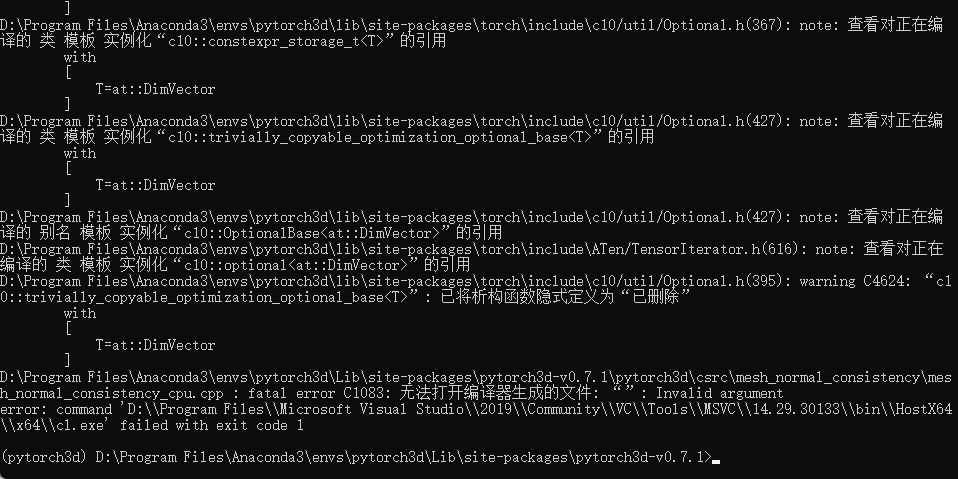
  出这个问题是因为pytorch3d的文件路径名字过长,VS不支持,把文件夹换个地方放就行了。
  问题原因的参考:https://www.it1352.com/1877257.html
总结
  pytorch3d装环境实在是过于折磨,建议还是参照其他人安装成功的软件版本,一步到位少走弯路。
- 本文链接:https://shinya754.github.io/2023/08/29/Windows-11-%E5%AE%89%E8%A3%85-pytorch3d%E5%8F%AF%E8%83%BD%E9%81%87%E5%88%B0%E7%9A%84%E9%97%AE%E9%A2%98%EF%BC%8C%E4%BB%A5%E5%8F%8A%E6%9C%80%E7%BB%88%E6%88%90%E5%8A%9F%E5%AE%89%E8%A3%85%E4%BD%BF%E7%94%A8%E7%9A%84%E7%89%88%E6%9C%AC%E5%88%86%E4%BA%AB%EF%BC%88%E4%BD%BF%E7%94%A8RTX3070%EF%BC%89/
- 版权声明:本博客所有文章除特别声明外,均默认采用 许可协议。